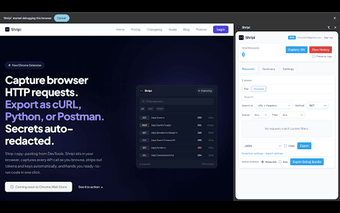
Shripi: Chrome extension for capturing and exporting API requests
Shripi, developed by Prakash Rai, is a Chrome extension that functions as an API debugging toolkit for developers and testers. It captures HTTP/HTTPS requests in real time, recording headers, bodies, timing, and responses while producing one-click exports to cURL, Python requests, Fetch, and Postman collections. The extension uses automatic redaction, advanced filtering, and configurable exclusion patterns to reduce noisy data. Target users include developers, QA engineers, and security researchers who need fast, local request capture and runnable code snippets.
The tool replaces manual Network tab exports for rapid request inspection
The tool captures HTTP and HTTPS traffic directly from browser tabs and records the full request lifecycle. Captured details include:
- request headers and bodies
- response payloads
- timing and status information
This approach eliminates the manual copying and header-cleanup that typically accompanies reproducing browser-originated API calls in external tools.
The tool reduces credential exposure by redacting secrets and keeping data local
The tool applies automatic redaction to hide auth tokens and API keys during capture and export. All captured data is stored locally in the browser's IndexedDB and the developer does not receive the traffic. That design supports workflows where sensitive request material must remain on the user's machine during debugging and documentation tasks.
The tool speeds reproduction by exporting runnable code snippets and collections
The tool offers one-click export to more than eight formats, including cURL, Python requests, JavaScript Fetch, and Postman collections. Exports produce ready-to-run snippets that reduce manual formatting time. A zero-configuration start means users can begin capturing with a single click, then export a code example for immediate use in external scripts or testing tools.
The tool fits into developer workflows through filtering, exclusions, and optional sync
The tool includes advanced filtering by URL, domain, HTTP method, and status codes, plus configurable URL exclusion patterns to ignore analytics or ad-tracking calls. It captures requests originating from the top-level page as well as same-tab iframes and service workers. No account is required to begin capturing; sign-in is only necessary to sync a Pro license across devices, which keeps basic usage friction low for teams.
Practical, browser-based API capture for developers who need local control
The tool is a practical option for developers and QA engineers who need quick, browser-contained API replication with exportable code. It is maintained by the developer and requires a Chromium-based browser to run, so teams using non-Chromium browsers must choose a different capture method. A useful tip: run captures in a clean browser profile to reduce unrelated third-party requests during recording.